Kefir’s crime sandbox, on PC

ROB RUN Cheats & Hacks for PC

ROB RUN is Kefir’s online crime sandbox in Looty Bay, where other players are the criminals and the police. This site is a Windows PC resource for that game: what the city asks of you, what this listing covers, and what can get an account banned.

If you are new to the city, start with the gameplay notes. The feature page is only the software this site actually lists, the store shows the two prices, and status is the page to reopen after a patch.

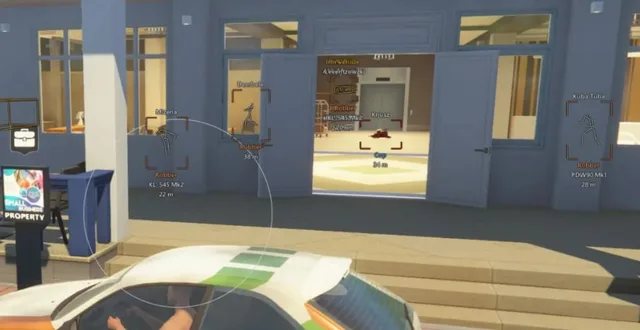
ROB RUN player labels on people inside a storefront, with distance and weapon names

Windows PC

Platform

2

Plans

USD

Currency

Worldwide

Market

Player ESP
Radar
Chase Markers
Soft Aim
Loot ESP
Check Status
Steam
Windows PC
Windows 10 and 11
Steam Early Access
Official servers
Intel and AMD
Easy Anti-Cheat
Recheck after patches
No console build
Two USD plans
Player ESP
Radar
Chase Markers
Soft Aim
Loot ESP
Check Status
Steam
Windows PC
Windows 10 and 11
Steam Early Access
Official servers
Intel and AMD
Easy Anti-Cheat
Recheck after patches
No console build
Two USD plans

Features

What this listing actually covers

These cards match the software described on this site. They are not a dump of every toggle a screenshot on another site might show.

Player ESP

Who is standing near you.

A mask makes you a criminal in Looty Bay. Without one you are a civilian, and police are other players who enlisted at the station. Player ESP is the listing’s name for labels on those nearby people.

  • Nearby player labels
  • Side and distance, when the build includes them
  • On foot or in a vehicle

Soft Aim

The combat option people look up as an aimbot.

The only aim option named on this listing is soft aim. It is optional. Silent aim and unattended automation are not described here, and Kefir’s help center says using cheats can result in a permanent ban.

  • Optional. Information overlays do not require it
  • Not sold here as silent aim
  • No promise that it stays usable after a patch

Chase Markers

Cars, getaways, and police pursuits.

Steam’s own description of ROB RUN is full of police chases. Players start in rented cars and work toward their own. Chase markers are the vehicle group on this listing, kept separate from player labels.

  • Vehicle targets
  • Pursuit context
  • Separate from the player overlay

World Info

The buildings a heist actually uses.

Kefir’s heist notes tell you to scout the building and the getaway before you put a mask on. World info is the listing’s set of city markers for stores, banks, hideouts, and the police station.

  • Stores and banks
  • Hideouts
  • Police station

Loot Markers

Cash, safes, and contraband.

A criminal who dies in the city loses the bag. Loot markers are labels for the cash, safes, and contraband a run is built around. They are not a bot that plays the heist for you.

  • Cash and safes
  • Contraband
  • Not an automation tool

Radar

The same street, drawn smaller.

Radar is listed as a compact 2D view of nearby players, vehicles, and loot. It sits next to player ESP so you are not covering the whole screen to know who just turned the corner.

  • Nearby players
  • Vehicles
  • Loot

Overlay Options

Keep ROB RUN’s own HUD usable.

The game already shows health, vehicles, and objectives. Overlay options exist so extra labels can be toned down instead of sitting on top of that interface.

  • Color choices
  • A way to hide world labels in a fight
  • Nothing here claims a stream-proof guarantee

Configuration

Save a profile, then leave it alone.

Menu keys and saved configs are listed so you are not rebuilding the panel every time you launch. After an Early Access patch, reopen status before you trust an old profile.

  • Menu and panic keys
  • Saved profiles
  • Recheck after a game update

Compatibility

Windows, Steam, and a moving target.

ROB RUN’s PC build is Early Access on Steam for Windows 10 and 11. Kefir has said the game will keep changing. Compatibility on this site is a note you recheck, not a permanent label.

  • Windows 10 and 11
  • Steam Early Access
  • Status page after every patch

Store

ROB RUN store

Monthly is $35 for 30 days. Lifetime is $150 once. The feature list does not change between them.

  • Available
  • ROB RUN
  • Windows PC
  • Steam
  • Early Access
  • 2 plans
ROB RUN player labels on people inside a storefront, with distance and weapon names
Available
ROB RUN
Windows PC

ROB RUN Cheats

Player information, vehicle markers, loot and world labels, radar, and optional soft aim for the Steam PC client.

  • Player ESP
  • Soft aim
  • Chase markers
  • Radar
  • Loot markers
  • World markers

Monthly

$35

USD / month · 30 days

30 days on the same feature list.

  • Same listed ESP, radar, and chase set
  • Optional soft aim
  • Steam Early Access on Windows PC
Choose Monthly

Lifetime

Best value

$150

USD · one-time · One-time

One payment. The list does not grow.

  • Same listed ESP, radar, and chase set
  • Optional soft aim
  • Steam Early Access on Windows PC
Choose Lifetime

Included modules

Modules both plans include

All features
  • Player ESP
  • Side and distance labels
  • On foot or in a vehicle
  • Chase markers
  • Loot markers
  • Store, bank, and hideout markers
  • Police station markers
  • 2D radar
  • Optional soft aim
  • Overlay colors
  • Menu and panic keys
  • Saveable configs

Other listings

HWID Spoofer and Cloud DMA sit outside the ROB RUN cheat.

  • Purple chip artwork for the HWID Spoofer listing

    HWID Spoofer

    The hardware ID spoofing tool to bypass hardware bans in any game.

    HWID Spoofer is the ultimate hardware ID spoofing tool to bypass hardware bans in any game.

    Our spoofer changes all hardware identifiers including disk serials, MAC addresses, GPU IDs, and more to give you a clean slate after bans.

    Works with EAC, BattlEye, Vanguard, and all major anti-cheats. It is sold on its own and is not part of the ROB RUN overlay. This site does not host the file.

    • Bypasses hardware bans in any game
    • Changes disk serials, MAC addresses, GPU IDs, and more
    • Clean slate after bans
    • Works with EAC, BattlEye, Vanguard, and all major anti-cheats
  • Purple cloud artwork for the Cloud DMA listing

    Cloud DMA

    Cloud memory access — no local DMA hardware needed.

    DMA is a way of reading game memory from outside the game process, usually with a second device. Cloud DMA is the hosted version of that idea, rather than a card you set up on your own desk.

    It is not required for the ROB RUN cheat. The overlay on this site is the Windows listing: player labels, chase markers, loot and world markers, radar, and optional soft aim.

    This page does not publish a hardware specification or a setup guide. Access notes, if you buy, come through checkout.

    • Cloud memory access — no local DMA hardware needed
    • Kernel bypass — undetected by all major anti-cheats
    • Zero software footprint on host PC
    • Compatible with all games in our catalog

Why this site

One game, two prices, and no borrowed promises

cheatsforrobrun.net stays on ROB RUN. The guides talk about Looty Bay. The store talks about the software listed here.

  • ROB RUN only

    The pages, prices, and articles are written for ROB RUN.

    ROB RUN Cheats
    Typical listing
  • Listed features only

    If a module is not on the features page, it is not part of what we sell.

    ROB RUN Cheats
    Typical listing
  • Monthly and lifetime plans

    The difference is how long access lasts, not a second feature set.

    ROB RUN Cheats
    Typical listing
  • Status before launch

    Treat an old “it worked last week” note as out of date after a client update.

    ROB RUN Cheats
    Typical listing
  • Windows PC on Steam

    macOS, Linux, and consoles are outside this product.

    ROB RUN Cheats
    Typical listing
  • Support you can actually use

    Support is email, not a download page.

    ROB RUN Cheats
    Typical listing

$35

Monthly plan

Thirty-day access billed in USD.

$150

Lifetime plan

One-time USD purchase for long-term access.

PC

Official platform

ROB RUN Early Access is listed for Windows PC through Steam.

Setup guide

Get on the Steam client without skipping the status check

ROB RUN itself installs from Steam. Software access, if you buy it, comes from checkout. This page is the order of operations for a Windows PC, not a file host.

  1. Confirm the game and the status note

  2. Pay on the store, then keep the receipt email

  3. Use a small profile first

How it works

Status first, then a saved profile.

The game installs from Steam. Access notes, if you buy, come from checkout. Nothing on this path is a public download.

4 steps

  1. 01

    Check current status

    Open the status page after a ROB RUN update before you assume last week’s build still applies.

  2. 02

    Pick a duration

    Monthly is $35 for 30 days. Lifetime is $150 once. The feature list is the same.

  3. 03

    Follow the notes you were sent

    Use the instructions from checkout on a Windows 10 or 11 PC that already runs ROB RUN through Steam.

  4. 04

    Save a small profile

    Enable the labels you can read. Soft aim stays off until you choose otherwise.

Guides

Guides and updates

How Looty Bay works, what a weekly wipe keeps, and what to read before you pay for software.

What to read on this site before you compare a plan: the city, the feature list, and the ban note.

Why nearby players in Looty Bay are hard to read, and what this site means by player ESP.

People search for an aimbot. This listing names soft aim, and it does not promise a silent or undetectable one.

FAQ

Questions about this page

Short answers for this page. The full set is on the FAQ.