
ROB RUN Software Pricing
Player information, vehicle markers, loot and world labels, radar, and optional soft aim for the Steam PC client.
Other listings
These two are separate from the ROB RUN cheat above. This site does not host the files.
-

HWID Spoofer
The hardware ID spoofing tool to bypass hardware bans in any game.
HWID Spoofer is the ultimate hardware ID spoofing tool to bypass hardware bans in any game.
Our spoofer changes all hardware identifiers including disk serials, MAC addresses, GPU IDs, and more to give you a clean slate after bans.
Works with EAC, BattlEye, Vanguard, and all major anti-cheats. It is sold on its own and is not part of the ROB RUN overlay. This site does not host the file.
- Bypasses hardware bans in any game
- Changes disk serials, MAC addresses, GPU IDs, and more
- Clean slate after bans
- Works with EAC, BattlEye, Vanguard, and all major anti-cheats
-

Cloud DMA
Cloud memory access — no local DMA hardware needed.
DMA is a way of reading game memory from outside the game process, usually with a second device. Cloud DMA is the hosted version of that idea, rather than a card you set up on your own desk.
It is not required for the ROB RUN cheat. The overlay on this site is the Windows listing: player labels, chase markers, loot and world markers, radar, and optional soft aim.
This page does not publish a hardware specification or a setup guide. Access notes, if you buy, come through checkout.
- Cloud memory access — no local DMA hardware needed
- Kernel bypass — undetected by all major anti-cheats
- Zero software footprint on host PC
- Compatible with all games in our catalog


At a glance
Key capabilities
The short version of ROB RUN Cheats: who is nearby, what is worth marking, and what is optional.
Overview
What you are comparing on this page
The city this software is aimed at, the groups included in the price, and what a patch can change.
ROB RUN is a shared city. Other players wear the masks, drive the getaways, and fill the police slots. The software on this page is a Windows listing for reading that city: player ESP, chase markers, loot markers, world markers, radar, and optional soft aim.
It is Early Access on Steam. Recheck the status page after a patch. Setup is the Windows order of operations, and it is not a download link.
Before a mask goes on, the useful questions in Looty Bay are simple. Who is police, who is already in a car, and where is the exit. The store groups those as player labels, chase markers, loot and world markers, and radar. The longer write-up is on features.
What is listed
Player ESP, chase markers, loot markers, world markers, radar, and optional soft aim. Farming bots are not on the list. If a clip online shows a module that is not named here, it is not part of this purchase. The FAQ covers that split, including the ban risk.
Plans
Monthly is $35 for 30 days. Lifetime is $150, paid once. Both are USD and both include the same feature list. Monthly vs lifetime is the short version of that choice. Neither plan includes a guarantee about bans or future patches.
Requirements
Windows 10 or 11 and the Steam Early Access client. The PC needs to run ROB RUN on its own. Read setup and status before you pay, especially the day after a game update.
Modules
What's included
The groups included with ROB RUN Cheats. If a module is not in this list, it is not part of the price.
- Player ESP
- Side and distance labels
- On foot or in a vehicle
- Chase markers
- Loot markers
- Store, bank, and hideout markers
- Police station markers
- 2D radar
- Optional soft aim
- Overlay colors
- Menu and panic keys
- Saveable configs
Experience
In the client · After you buy
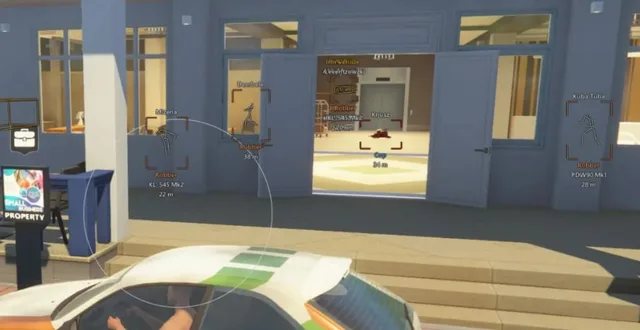
Use the screenshots above for ROB RUN Cheats—below is what each layer means and how access works after you complete checkout.
In-game layers
- Layer A
Storefront
Player labels through a doorway: name, distance, and the weapon that player is holding.
- Layer B
Street
Boxes on nearby people and cars, with distance, outside a city building.
- Layer C
Police vehicle
A box on a police car and a label on the person standing next to it.
- Layer D
Bar
An interior label on another player, with distance, across the room from the counter.
- Layer E
Shop front
Labels on people inside a shop, readable from the street, including distance.
Guides
Learn more about ROB RUN Cheats
City guides, the wipe, Early Access, and the Windows notes. The store list is still the purchase.
What to read on this site before you compare a plan: the city, the feature list, and the ban note.

Why nearby players in Looty Bay are hard to read, and what this site means by player ESP.

People search for an aimbot. This listing names soft aim, and it does not promise a silent or undetectable one.

Police chases and rented cars are part of ROB RUN. Chase markers are the vehicle group on this listing.

A smaller local picture of players, cars, and loot when a full overlay is too much.
What a bag is worth in Looty Bay, and what loot markers on this listing are for.
Stores, banks, hideouts, and the police station, and how a heist is supposed to be scouted.
Windows 10 or 11, Steam, and the order to follow after you pay. Cloud DMA is a separate listing. No files are hosted here.
FAQ
Questions about this page
Short answers for this page. The full set is on the FAQ.